
If you are someone looking for activation process of Microsoft Office Professional Plus 2019 or 2021 this step-by-step process will help you. Activation process take only 5 minutes. and it will be activated for life-time on the same PC.
Uninstall old version of Microsoft Office from the system
You can’t run 2 Microsoft Office application on the same pc, you have to remove all Microsoft Office application that you have on your system.
We recommended to use Microsoft Recovery Assist Application to remove Microsoft Office from the pc. Single PC/ Laptop cannot use 2 Microsoft application, and if you do then activation/ installation issue will raise.
Download link 🔗: https://aka.ms/diag_officeuninstall
And if you already have the version you have purchased, and it’s not pirated, then you can start with the activation process.
Official Download Links for Microsoft Office Professional Pro
If your pc does not have Microsoft Office installed, then you can download it from the Official download link
Installation Process for Microsoft Office
After you have downloaded the file, you have to double-click and install the application on the system. And open any new WORD or Excel application on your system. Then it will ask you to enter a product key.
Step-by-step video guide on how to change product key of MS office 2019/2021
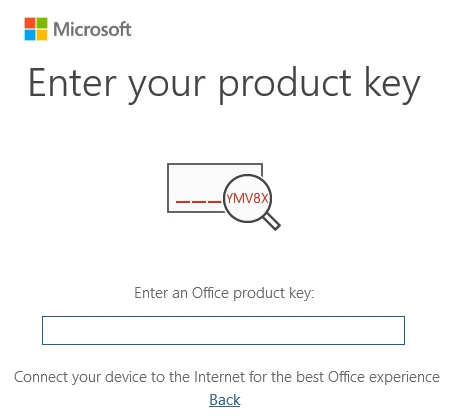
You will get the product key at your email id, after the payment is completed. Copy and paste the product in the box.
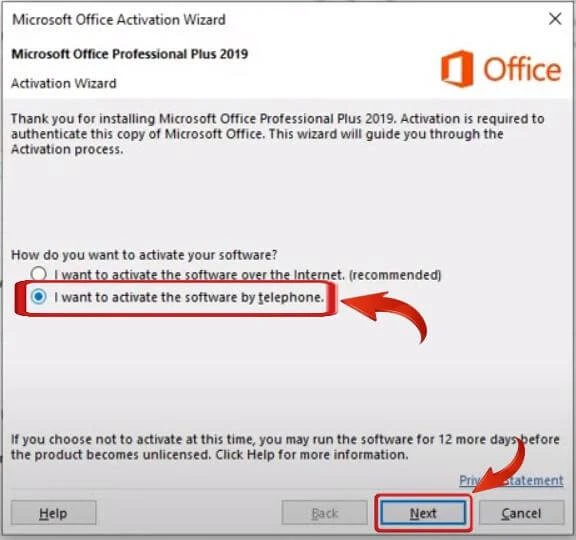
After it’s accepted, you will get 2 options for activation.
- Online activation process.
- Telephone activation process.
If you use the Online activation process, the product will not work. As this product key is for Telephone activation only.
Calling the Microsoft IVR number
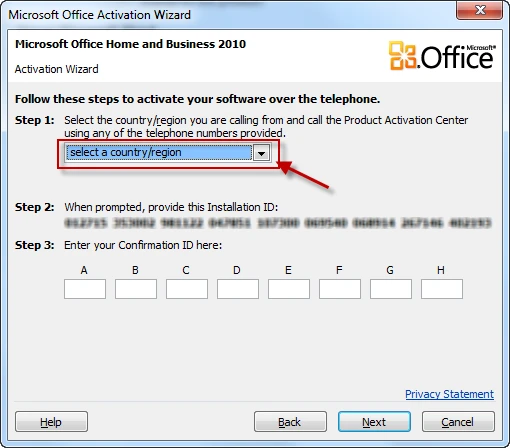
The last steps is to dial Microsoft IVR number from your phone. And Microsoft IVR system will give user activation ID. You need to select country as India.
Microsoft number 000800 040 4453, Don’t delete any zero’s. Dial from Jio, Airtel and V Numbers.
Please contunue in English, as the Hindi IVR does not work. When call connected to Microsoft IVR, it says Hindi ke liye 2 dabay. You don’t press 2. Wait for 10 seconds it will continue the voice in English.
Calling Microsoft IVR number from the phone
The first step is to dial the Microsoft product activation number and wait on the line. Once connected, you will be prompted to press a number to indicate the product you want to activate.
Windows activation is option 1, Office for Mac activation is option 2, and Other Office Products or PC games activation is option 3.
Chose the option 3, If you are at your computer with the activation wizard open, press 1. Otherwise, press 2.
When prompted, enter the installation ID which is a long number broken into several groups.
The system will ask you to enter each group one by one. After you enter all the groups, the system will ask you the number of different computers that have been installed with this copy of windows.
Then the system will read you a confirmation ID which you will need to enter into the empty blocks on the activation window. After the confirmation ID is entered, the activation process should be complete.
Step-by-step process in the video
FAQ
I have followed the process but did not worked?
Kindly watch the video guide carefully and follow the steps.. And you need to check the version of Microsoft you had purchased and trying to activate.
Sometime user use the product key on LTSC version which does not take activation.
Unable to call Microsoft IVR number!
You need to dial the number without deleting any zeroes from the beginnings 000800 040 4453. BSNL will not connect the call. And this is toll-free number.
After entering the product key IVR says product key is invalid!
If the IVR says the key or installation ID is invalid, kindly drop and email with Activation setting page screen shoot. Mail id sale@sayprint.in, please share the call recording so we can hear the exact error and give you right solution.
Can I use https://getcid.info?
No, currently they are not giving Confirmation ID’s for free. Its a changeable services. Still you can use an alternative tikeys.com
Can I get replacement with online activate key?
Yes, you can purchase online activation product key from the store, then contact us back by email with the old order id and mention the UPI id, we will refund you back.
Can you generate Confrimation ID for me?
Yes, we does generated confrimation id for buyers, its changeble service becuase we need to pay a third party to generate confrimation id by API.
You can contact us by email regarding this, we will share the payment link of Rs 49. Once the payment is received within minutes we will share the confrimation id by Email.


12 Responses
it does not recognise the security code we entering. can you help me on this
Worst service, while purchasing it online and after validating it, it says invalid id.
It is asking for a confirmation ID
I have not been given a confirmation ID
PLEASE PROVIDE AND RESOLVE
not able to verify security code. IVR says i am not able to verify your 3 character . tried many times.
Thank you Keyslo I have activated MS OFFICE sucessfully
Thanks to the seller for this low price!! I just activated my office 2021 pro plus; Great price and activation process is bit long on ivr but if you give little time and clear instructions you are good to go. you have to speak clear and slow so just take your time and clam and a quiet place.
I followed every step as per your direction but it could not be activated. Either you activate the product or give back the money
I’m trying to call but no number is reachable. i try every number not working
The Microsoft no. 000800 040 4453 is not connecting from Airtel no.
i like it
How to install
?
IT SAYS SORRY, THE CONFIRMATION ID DOES NOT MATCH WITH THEIRS, TRY AFTER 48 HOURS. OR CONTACT WITH SOFTWARE PROVIDER.